We let an AI agent fix a CVE on our servers, with approval
We gave Claude a narrow key to our Gardience fleet and asked it to deal with Node2Shell. It found the exposed server, got refused four times for asking too broadly, requested the fix with a reason, waited for a person to approve, and then checked its own work.
Everybody is about to let AI agents touch their servers. Some people already have. The question we keep coming back to isn't whether the AI is smart enough. It's what happens when it's wrong, or when someone tricks it, or when it decides to be helpful on 600 machines instead of two.
So we tried it on our own lab fleet. We connected Claude to Gardience and asked it to deal with Node2Shell (CVE-2026-111497, the Brotli bug that's been in the news this week). Here's exactly what happened.
The setup#
Our lab has 11 Linux and Windows machines. In Gardience we made Claude its own API key, and kept it narrow on purpose:
- It can read the fleet, but only the machines in one group,
Ring0-Pilot(our pilot ring, two machines). - It can request exactly one runbook, "Fix a CVE." Nothing else. No shell commands, no other runbooks.
- Every request needs a person to approve it. The key's owner can't approve their own requests either.
- It expires in 7 days.
Then we pointed Claude Code at Gardience's MCP server with that key and gave it one instruction:
I just read about Node2Shell, CVE-2026-111497, the Node.js Brotli bug. Using our Gardience fleet console, find out which of our servers are exposed. Fix what can be fixed on the servers you're allowed to touch: preview first, then request the fix properly with a reason.
What it did#
- Looked up the CVE. It called Gardience's
vulnerabilitiestool with the CVE. Because the key only sees the pilot ring, it saw two machines:linux-web-01exposed with a fix available through its brotli package, and a simulated machine that wasn't checked. The other exposed machines in our fleet were invisible to it. - Tried to go broad, and got told no. It previewed the fix on "All machines." Gardience answered: not allowed for this key. Then "Linux." Not allowed. Then "webservers," then "web." Not allowed, not allowed. Then it found
Ring0-Pilot, the one group it was allowed, and the preview showed exactly which machine would change. - Requested the fix, with a reason. It asked for "Fix a CVE" on the pilot ring and explained why in plain words: which CVE, which machine, which package, and that only the exposed machine would change.
- Told us nothing had happened yet. Its summary ended with: "Nothing has changed on the server yet. Once someone approves it, the brotli fix installs on linux-web-01."
We liked step 2 the most. The AI did the reasonable thing, asking for more than it needed, and the guardrail did its job without anyone watching. It didn't argue or try to work around it. It just found what it was allowed to do.
The approval#
A second person has to approve it. In our lab that's a test approver account, Carol. She opened Gardience and saw this:

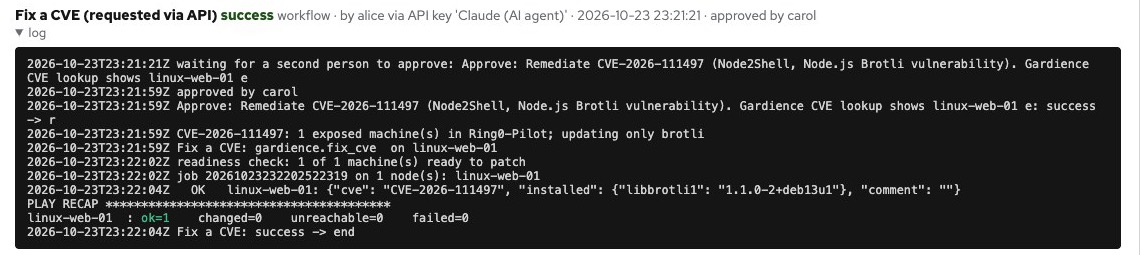
It says who asked, all the way down to the key: "alice via API key 'Claude (AI agent)'." It shows the reason the agent gave. That matters. An approver should know an AI is asking, and why, before they say yes.
She approved it. Gardience installed only the brotli fix on linux-web-01, nothing else that was pending, and logged the result:
Checking its own work#
A few minutes later, after the next vulnerability check, we asked Claude whether it worked. It checked the run, the approvals and the CVE again on its own, and answered:
Yes, the fix was approved and it worked. Carol approved the CVE-2026-111497 remediation, and the runbook then updated the brotli package on linux-web-01, the only exposed machine. The latest vulnerability scan now shows linux-web-01 as not exposed, with no approvals left pending.
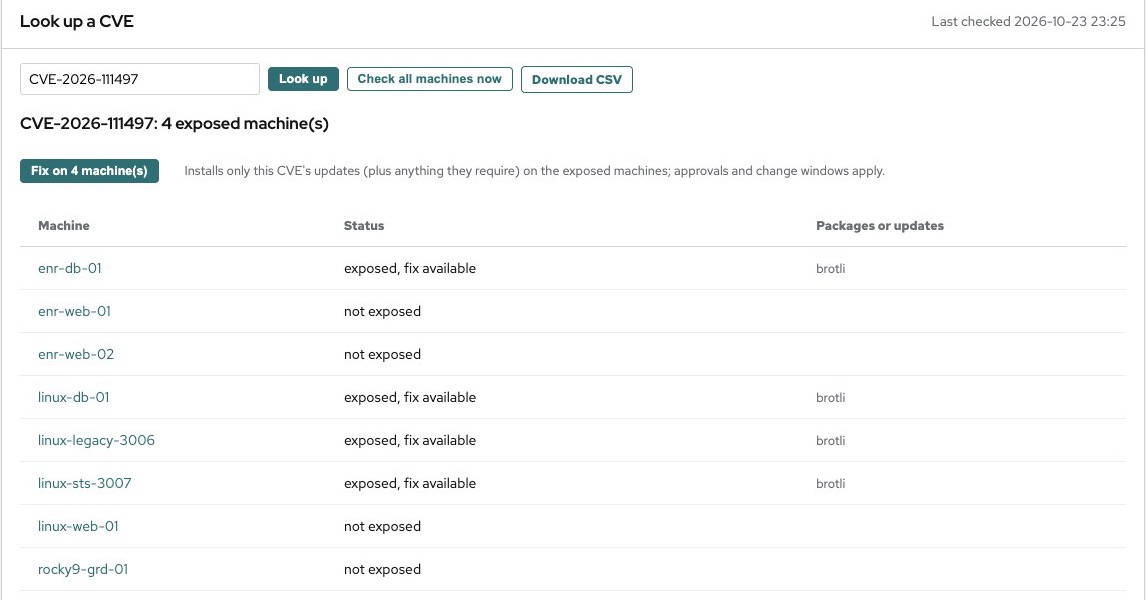
Here's the same lookup in Gardience afterwards. linux-web-01 is clean. The machines outside Claude's key are still exposed, because it was never allowed near them. That's on us to schedule, not on the AI to decide.
Every read and request it made is in the tamper-evident audit log with the key's name on it: what it looked up, what it asked for, what it was refused, who approved, and what changed.
What we took from it#
The AI part was honestly the easy part. Claude found the right machine, understood the CVE and wrote a better change reason than most people do. What made us comfortable was everything around it:
- It could only see what it needed. A narrow key meant a narrow view, not just narrow permissions.
- It could only ask, not do. Every change waited for a person who could see it was an AI asking.
- The blast radius was decided ahead of time, by us, not by the agent in the moment.
- There's a record of every step that we could hand to an auditor.
We don't think the future is people clicking through patch screens. We think it's AI agents doing most of the work and a few people approving the changes that matter. The part you need to get right is the rules, not the AI.
Try it yourself#
This works with any AI tool that speaks MCP (Claude, ChatGPT, Cursor and others). In Gardience 1.9.2 or later:
- Settings > API keys: make an operate key for the agent, limited to the runbooks and node groups it needs, with approval required.
- Point your MCP client at
https://YOUR-GARDIENCE/gardience/mcpwith the key as a bearer token. - Optional: give it the Gardience skill from the install bundle, which teaches it to preview before requesting and to treat fleet data as data, not instructions.
The AI agents docs have the details, and the 90-day trial has every feature on.
Try Gardience on your own machines
One supported console for Windows and Linux on open-source Salt: patching, a scored STIG/CIS-aligned baseline, drift repair, event-driven automation, two-person approval and a tamper-evident audit log. Flat yearly pricing, not per node.
Free 90-day trial (25 nodes)See it work Compare