Collabora in Nextcloud (CVE-2026-110447): find and fix it
The exploited Collabora built-in CODE server bug lives in a Nextcloud app, not an OS package, so package-based CVE scanners say you are safe. How we found every copy in our lab, checked for planted files, and updated it, with the commands.
CISA added CVE-2026-110447 to its Known Exploited Vulnerabilities list on October 23, which means attackers are already using it. It is a command injection bug, rated 9.8 out of 10, in the Collabora Online built-in CODE server, the Nextcloud app that lets people edit Office documents without running a separate Collabora server. Reports say attackers have been dropping web shells through it and then hunting for passwords and crypto wallets.
So we did what we always do: we looked it up in our own CVE scanner. It said none of our machines were exposed.
That answer was wrong, and it is wrong in every package-based scanner, not just ours. Here is why, and what we did instead.
What is affected#
- Affected: the Nextcloud app Collabora Online - Built-in CODE Server (app id
richdocumentscode, orrichdocumentscode_arm64on ARM servers) before 26.4.303. The flaw is in the app'sproxy.php, and it can be reached when the built-in CODE server is not running, for example right after a restart. - Fixed: 26.4.303 (September 11). The current release is 26.4.502.
- Not affected: a standalone Collabora Online server that Nextcloud connects to over the network. This is only the built-in one that runs inside Nextcloud.
The advisory is GHSA-f97p-r72q-64h2.
Why our scanner said we were safe#
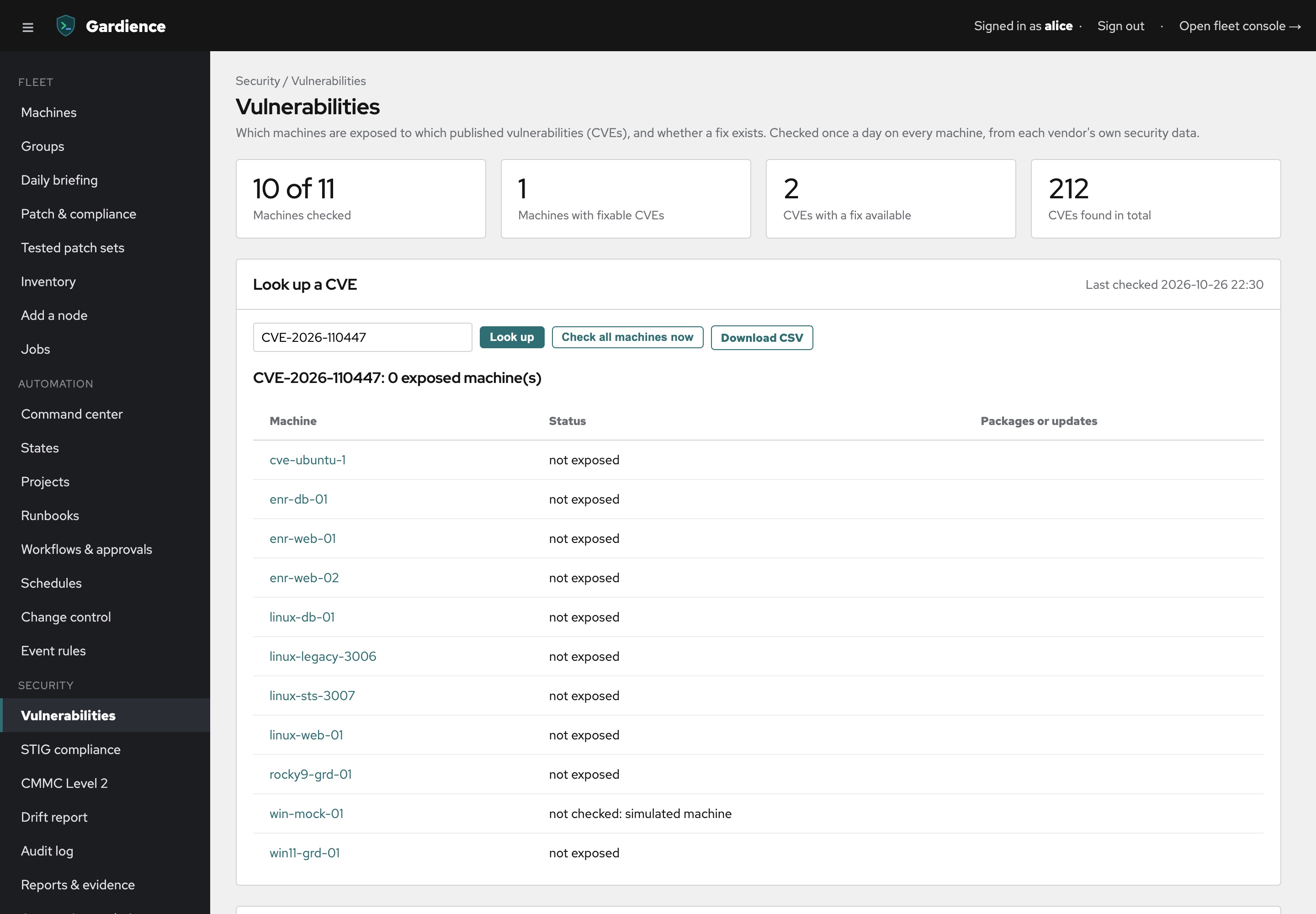
Gardience checks every machine against each vendor's own security data: Debian, Ubuntu, Red Hat, and Microsoft. Those lists cover packages the operating system installed. A Nextcloud app is not one of those. Nextcloud downloads it from its own app store into its own folder, and no distribution's security tracker knows it is there.
So the honest answer from a package scanner is "none of your packages are affected," which is true and useless. That is the same blind spot we wrote about for Node.js on Windows: if something did not come from the OS package manager, an OS CVE check cannot see it.
You have to ask the servers directly.
The lab test#
Our test lab has eight Linux machines. Two of them run Nextcloud on Debian 13:
- linux-web-01 with the built-in CODE server at 26.4.302, the last vulnerable version
- linux-sts-3007 with 26.4.502, already fixed
To test the "were we already hit?" step without running a real exploit, we put a harmless stand-in file, cache-helper.php, inside the vulnerable app's folder on linux-web-01. It contains only a comment. It stands in for the kind of file an attacker would leave behind.
Everything below ran as one command at a time on all eight Linux machines from Gardience's Run a command runbook. The same commands work over SSH on a single server.
1. Find every copy and its version#
find /var/www /srv /opt -path "*/apps/richdocumentscode*/appinfo/info.xml" \
  -exec grep -H "<version>" {} + 2>/dev/null | grep . || echo "no Collabora built-in CODE server here"
If your Nextcloud lives somewhere else, add that folder to the list.
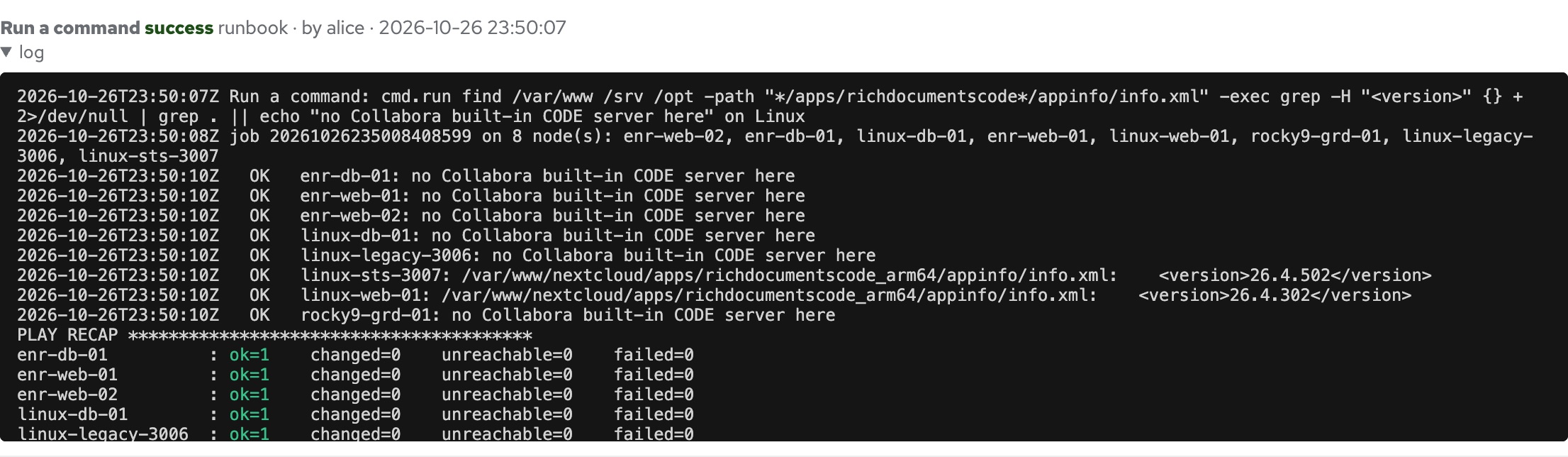
Six machines had no Nextcloud. linux-sts-3007 was on 26.4.502. linux-web-01 was on 26.4.302: vulnerable. That took a few seconds, for eight machines or eight hundred.
2. Look for planted files before you update#
This is the step people skip, and the order matters. Nextcloud can compare an app's files with the signed list the developer published:
cd /var/www/nextcloud
sudo -u www-data php occ integrity:check-app richdocumentscode      # or richdocumentscode_arm64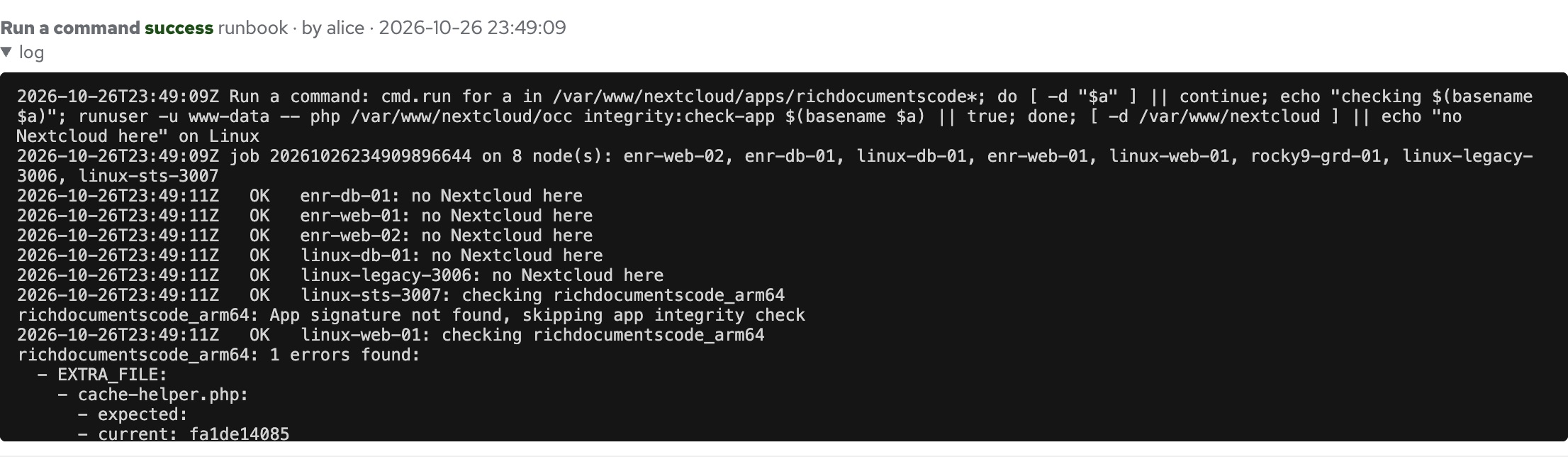
It found our stand-in right away: EXTRA_FILE: cache-helper.php, a file the real app does not have.
Two things we learned here:
- Check before you update. When we updated in step 3, the update replaced the whole app folder and our planted file was gone. That sounds good, but it also deletes your evidence, and it does nothing about anything an attacker put somewhere else. Find it first, save a copy, then update.
- The check can skip. On linux-sts-3007 it said "App signature not found, skipping app integrity check." When that happens, you get no answer, not a clean answer. Look for PHP files changed recently anywhere in Nextcloud's web folder (not the data folder), and check your web server logs for requests to
proxy.php:
find /var/www/nextcloud -path /var/www/nextcloud/data -prune -o -name "*.php" -mtime -60 -print | head -50
grep -h "richdocumentscode.*proxy.php" /var/log/nginx/access.log* /var/log/apache2/access.log* 2>/dev/null | tail -50
If you find something you did not put there, treat the server as compromised: take it off the network, change every password and key that was on it, and rebuild it rather than cleaning it.
3. Update#
cd /var/www/nextcloud
sudo -u www-data php occ app:update richdocumentscode      # or richdocumentscode_arm64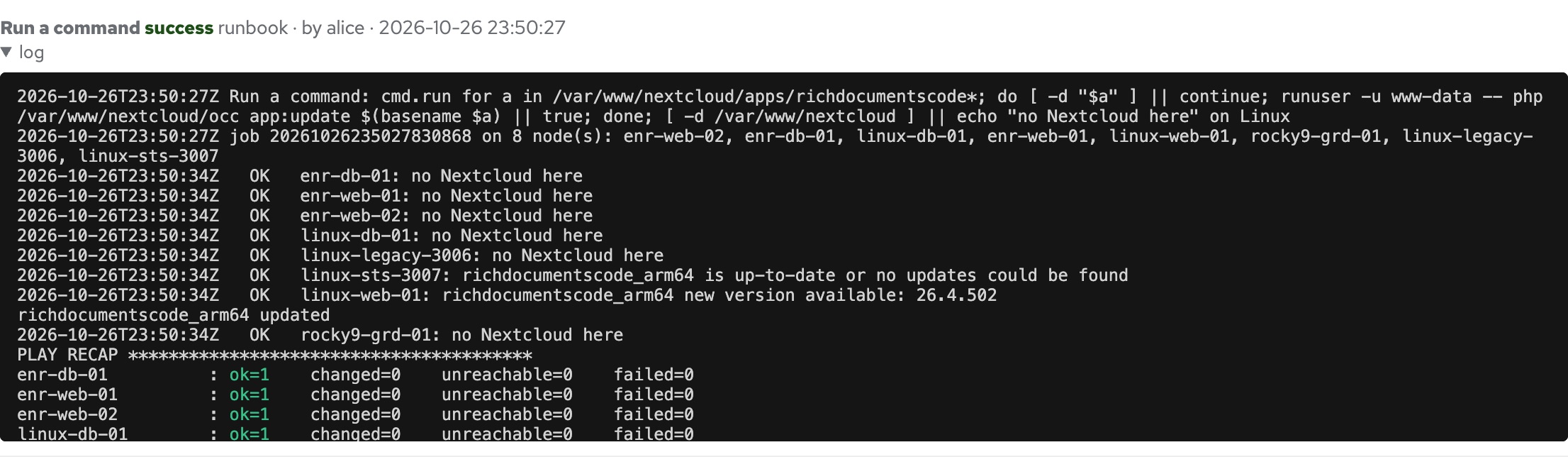
linux-web-01 went to 26.4.502. linux-sts-3007 said it was already up to date, and the other six had nothing to do.
If you cannot update today, turn the app off until you can:
sudo -u www-data php occ app:disable richdocumentscodeDocument editing stops working while it is off. That is a fair trade for a bug that is being exploited.
4. Prove it#
Run the same find again:
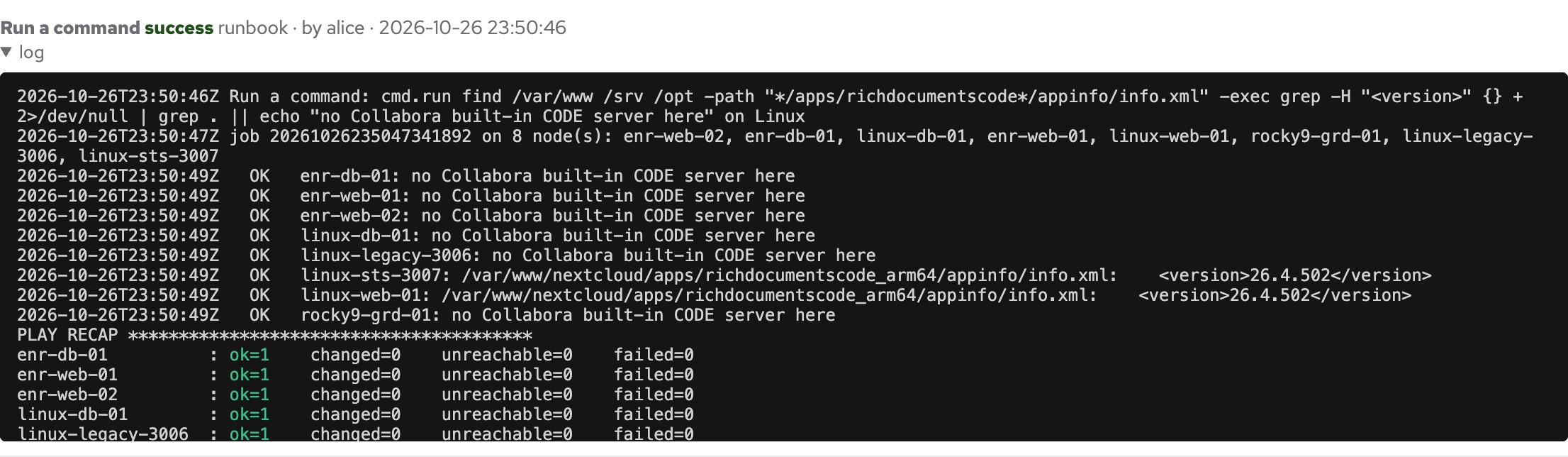
Both Nextcloud servers report 26.4.502. Every run above, with who ran it and each machine's output, is in Gardience's audit log, which is the record you want when someone asks "did we patch that?"
What we are taking away from this#
Our CVE scanner did its job and still gave us the wrong answer for this bug. The fix is not a better scanner. It is knowing what each check can see:
| Where the software came from | Does an OS package CVE check see it? | How to check |
|---|---|---|
| The OS package manager (apt, dnf, Windows Update) | Yes | Your CVE scanner |
| An app's own store (Nextcloud apps, WordPress plugins) | No | Ask the app: occ app:list, wp plugin list |
| Containers | No | Scan the image, rebuild on a fixed base |
| Installed by hand (Node.js on Windows, compiled PHP) | No | Look for the file and its version |
For the second, third, and fourth rows, the answer is the same: ask every server directly, at once, and keep the record.
Questions#
Which version fixes CVE-2026-110447?#
Collabora Online built-in CODE server 26.4.303 and later. The current release is 26.4.502.
Is standalone Collabora Online affected?#
No. Only the built-in CODE server app that runs inside Nextcloud (richdocumentscode and richdocumentscode_arm64).
Why does my vulnerability scanner say I am not exposed?#
Most server CVE scanners compare OS packages with the vendor's security data. The built-in CODE server is a Nextcloud app, not an OS package, so those scanners do not see it. Check the app version in Nextcloud or with the find command above.
Does updating remove a web shell?#
Only one inside the app's own folder, because the update replaces that folder. An attacker can put files anywhere the web server can write. Check before you update, and rebuild the server if you find anything.
Try Gardience on your own machines
One supported console for Windows and Linux on open-source Salt: patching, a scored STIG/CIS-aligned baseline, drift repair, event-driven automation, two-person approval and a tamper-evident audit log. Flat yearly pricing, not per node.
Free 90-day trial (25 nodes)See it work Compare